HomeGPT:AI Interior Design
About This App
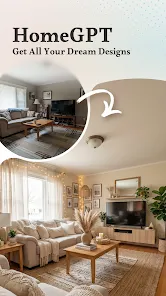

Transform your home effortlessly with AI Home Design — your all-in-one AI-powered solution for interior, exterior, and outdoor space design. Just upload a photo, choose a style, and let AI instantly generate stunning design results. No design skills required. Whether you’re renovating, redecorating, or just exploring ideas, AI Home Design helps you visualize your dream space in seconds. ✨ Key Features 🏠 Interior Design Redesign living rooms, bedrooms, kitchens, and more with realistic AI-powered results. 🏡 Exterior Design Refresh your home’s exterior, facade, and curb appeal instantly. 🌿 Garden & Outdoor Design Design gardens, patios, yards, and outdoor living spaces with beautiful layouts. 🎥 Video Tour One-click conversion of interior and exterior design images into a video tour, presenting a full view of your home. 🪑 Item Swap Replace furniture, decor, lighting, and materials with AI — preview before you buy. 🎨 Style Match Upload a reference image and transfer its style to your own space. 🧱 Wall Makeover Change wall colors, textures, and finishes in one click. 🪵 Floor Makeover Try different floor materials and colors instantly. 📐 Floorplan to 3D Turn 2D floor plans into realistic 3D visualizations. 👨💼AI Home Design Expert Have home renovation questions? Ask the AI renovation assistant. Skip expensive consultation fees—perfect for DIY home projects. 💡 Why Choose AI Home Design? -- One photo → professional-quality designs -- Interior, exterior & garden all in one app -- Multiple styles: Modern, Minimal, Rustic, Luxury & more -- Beginner-friendly, fast, and intuitive -- Save time and money before real renovation 【Automatic Subscription Service Description】 1. Subscription service: VIP Weekly membership (1 week), VIP Annual membership (1 year) 2. Payment: Payment will be charged to your Google account upon confirmation of purchase. 3. Automatic renewal: Your Google Play account will be charged within 24 hours before the end of the subscription period, and the subscription will automatically extend for another period. 4. Cancel Subscription: Go to Google Play > Subscriptions → select the subscription → Cancel Subscription. To avoid renewal charges, cancel at least 24 hours before the end of the current billing cycle. 5.Refunds:For refunds, please contact Google Play Support and provide detailed reasons for cancellation. Google Play will review your request.
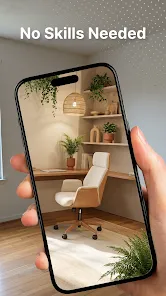
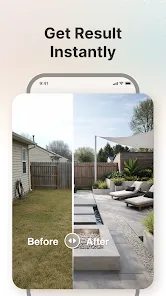
Just upload a photo, choose a style, and let AI instantly generate stunning design results. No design skills required.
Whether you’re renovating, redecorating, or just exploring ideas, AI Home Design helps you visualize your dream space in seconds.
✨ Key Features
🏠 Interior Design
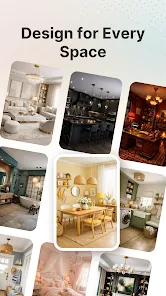
Redesign living rooms, bedrooms, kitchens, and more with realistic AI-powered results.
🏡 Exterior Design
Refresh your home’s exterior, facade, and curb appeal instantly.
🌿 Garden & Outdoor Design
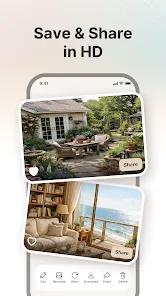
Design gardens, patios, yards, and outdoor living spaces with beautiful layouts.
🎥 Video Tour
One-click conversion of interior and exterior design images into a video tour, presenting a full view of your home.
🪑 Item Swap
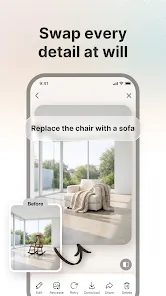
Replace furniture, decor, lighting, and materials with AI — preview before you buy.
🎨 Style Match
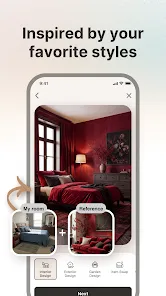
Upload a reference image and transfer its style to your own space.
🧱 Wall Makeover
Change wall colors, textures, and finishes in one click.
🪵 Floor Makeover
Try different floor materials and colors instantly.
📐 Floorplan to 3D
Turn 2D floor plans into realistic 3D visualizations.
👨💼AI Home Design Expert
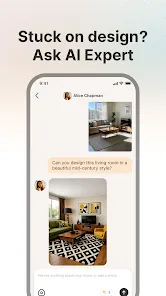
Have home renovation questions? Ask the AI renovation assistant. Skip expensive consultation fees—perfect for DIY home projects.
💡 Why Choose AI Home Design?
-- One photo → professional-quality designs
-- Interior, exterior & garden all in one app
-- Multiple styles: Modern, Minimal, Rustic, Luxury & more
-- Beginner-friendly, fast, and intuitive
-- Save time and money before real renovation
【Automatic Subscription Service Description】
1. Subscription service:
VIP Weekly membership (1 week), VIP Annual membership (1 year)
2. Payment: Payment will be charged to your Google account upon confirmation of purchase.
3. Automatic renewal: Your Google Play account will be charged within 24 hours before the end of the subscription period, and the subscription will automatically extend for another period.
4. Cancel Subscription: Go to Google Play > Subscriptions → select the subscription → Cancel Subscription. To avoid renewal charges, cancel at least 24 hours before the end of the current billing cycle.
5.Refunds:For refunds, please contact Google Play Support and provide detailed reasons for cancellation. Google Play will review your request.